# Node-driven(Cloud)

## Server (PC) Basics

* The installation must be performed in an internet-enabled environment
* Recommendations

  CPU: 4Core or faster \
  Memory: 16GB or more \
  Disk: 500GB or more (SSD recommended)&#x20;
* Node Client Downloads

{% file src="<https://1474809128-files.gitbook.io/~/files/v0/b/gitbook-x-prod.appspot.com/o/spaces%2F9EJKm4MWc99wv6C4AOqx%2Fuploads%2F9zDN502Y0jabPPdDyYxL%2F2026_Guide.zip?alt=media&token=5364478b-c9a3-4bac-b863-b4c8ddbb62e8>" %}

\
AWS Server Installation Example

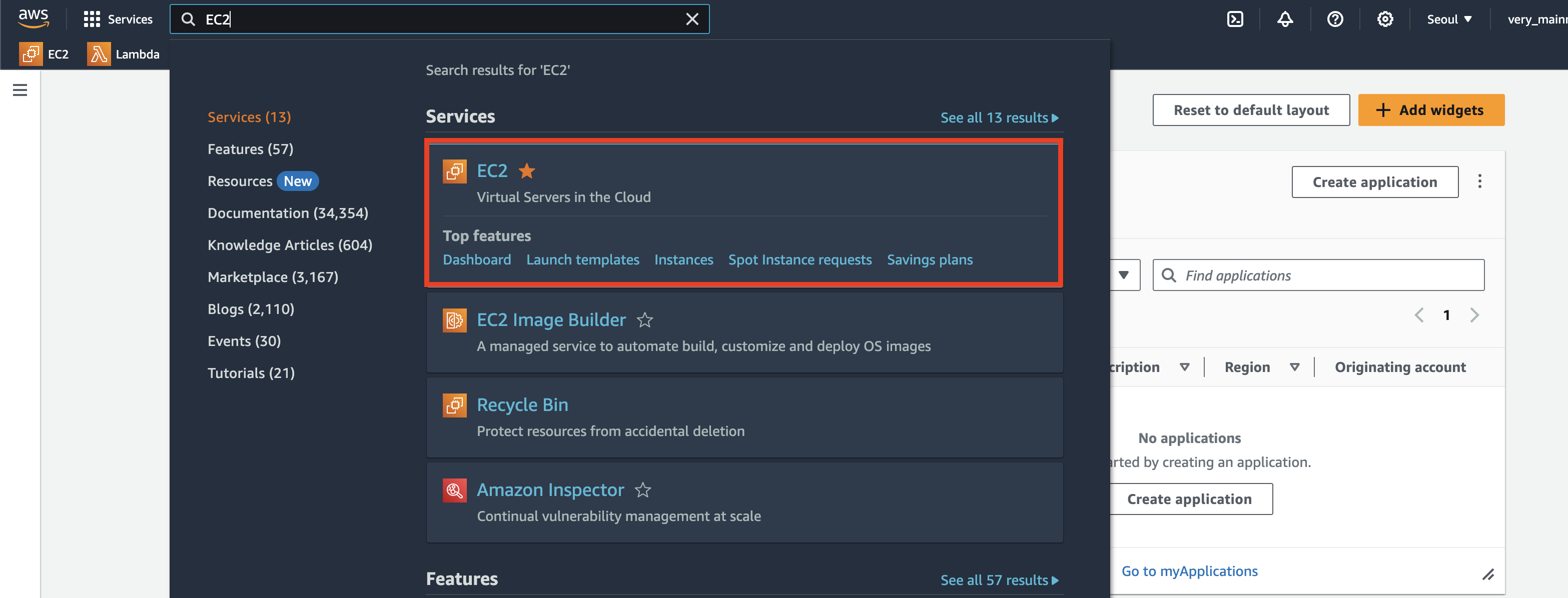
1. AWS Login → Search EC2 in the search bar

<figure><img src="https://content.gitbook.com/content/9EJKm4MWc99wv6C4AOqx/blobs/Cs6mWTo3jh4c1IsSPFNs/%E1%84%89%E1%85%B3%E1%84%8F%E1%85%B3%E1%84%85%E1%85%B5%E1%86%AB%E1%84%89%E1%85%A3%E1%86%BA%202024-01-14%20%E1%84%8B%E1%85%A9%E1%84%92%E1%85%AE%209.47.26.png" alt=""><figcaption></figcaption></figure>

2. Click Launch Instances in the top right corner

<figure><img src="https://1474809128-files.gitbook.io/~/files/v0/b/gitbook-x-prod.appspot.com/o/spaces%2F9EJKm4MWc99wv6C4AOqx%2Fuploads%2FEYRTYB7dzcmseMJvkJbu%2F%E1%84%89%E1%85%B3%E1%84%8F%E1%85%B3%E1%84%85%E1%85%B5%E1%86%AB%E1%84%89%E1%85%A3%E1%86%BA%202024-01-14%20%E1%84%8B%E1%85%A9%E1%84%92%E1%85%AE%209.48.00.png?alt=media&#x26;token=4bec4b9f-ea15-42c3-8d44-60c64cc840a5" alt=""><figcaption></figcaption></figure>

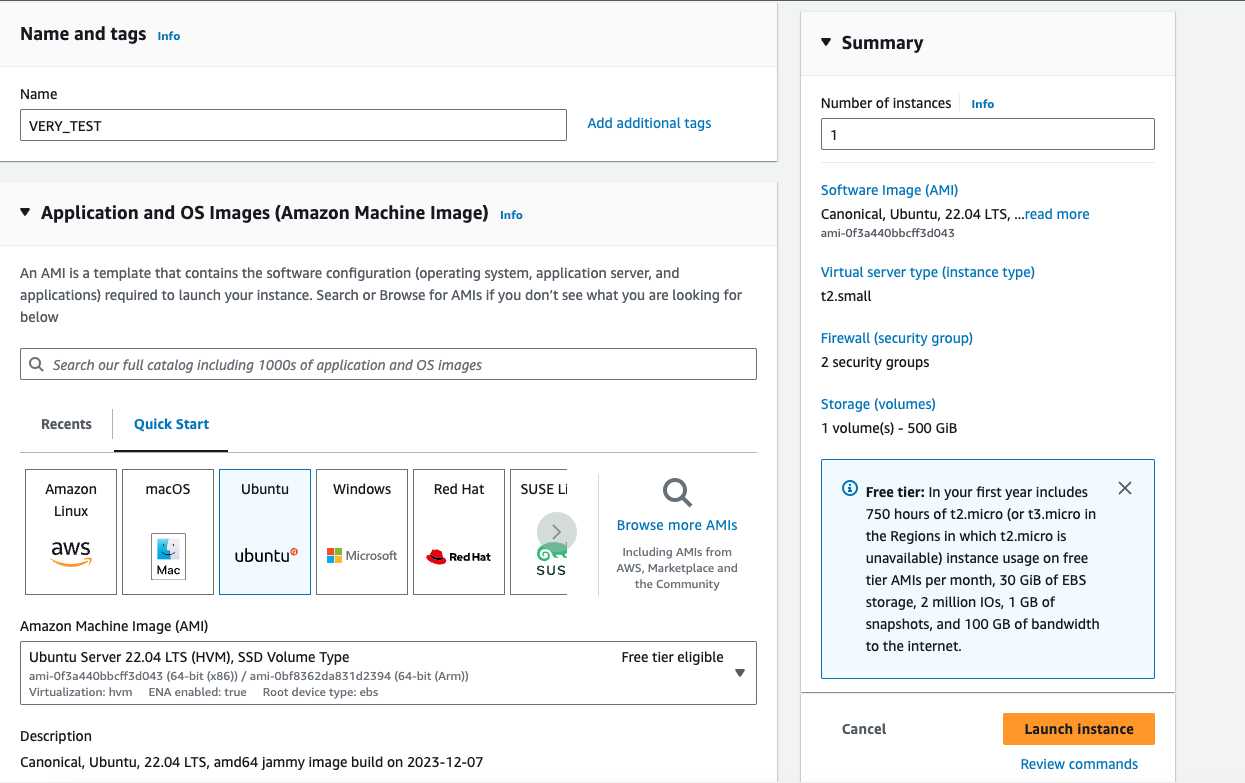
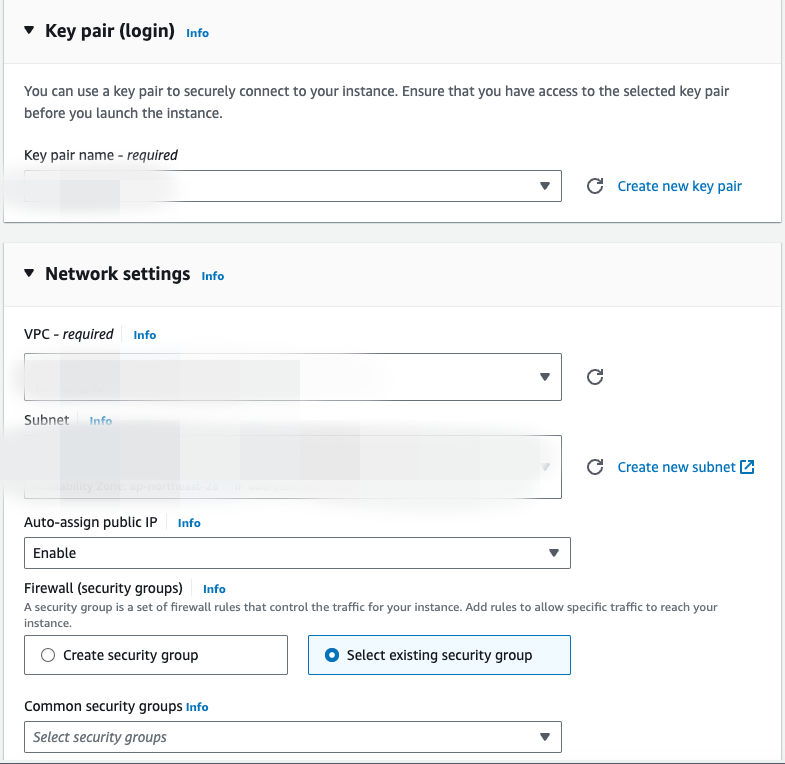
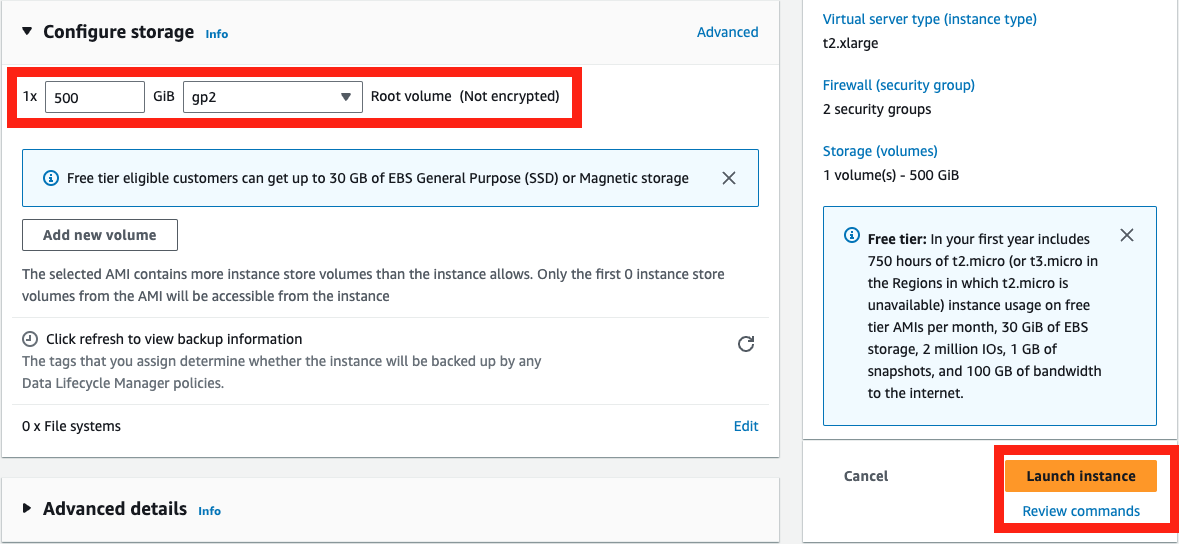
3. Server Settings
   1. IP and Key information is mosaicked for security (be careful of exposure)&#x20;
   2. Click Launch Instatnce after setting 500GB

<figure><img src="https://content.gitbook.com/content/9EJKm4MWc99wv6C4AOqx/blobs/wSJFjZPNayAmiPTBFwud/%E1%84%89%E1%85%B3%E1%84%8F%E1%85%B3%E1%84%85%E1%85%B5%E1%86%AB%E1%84%89%E1%85%A3%E1%86%BA%202024-01-16%20%E1%84%8B%E1%85%A9%E1%84%92%E1%85%AE%208.30.29.png" alt=""><figcaption></figcaption></figure>

<figure><img src="https://content.gitbook.com/content/9EJKm4MWc99wv6C4AOqx/blobs/1j2HwS52kOrltUk6WBoT/%E1%84%89%E1%85%B3%E1%84%8F%E1%85%B3%E1%84%85%E1%85%B5%E1%86%AB%E1%84%89%E1%85%A3%E1%86%BA%202024-01-16%20%E1%84%8B%E1%85%A9%E1%84%92%E1%85%AE%208.36.40.png" alt=""><figcaption></figcaption></figure>

<figure><img src="https://content.gitbook.com/content/9EJKm4MWc99wv6C4AOqx/blobs/GXT8ZhMwr6UHc8p31GEI/%E1%84%89%E1%85%B3%E1%84%8F%E1%85%B3%E1%84%85%E1%85%B5%E1%86%AB%E1%84%89%E1%85%A3%E1%86%BA%202024-01-16%20%E1%84%8B%E1%85%A9%E1%84%92%E1%85%AE%208.34.57.png" alt=""><figcaption></figcaption></figure>

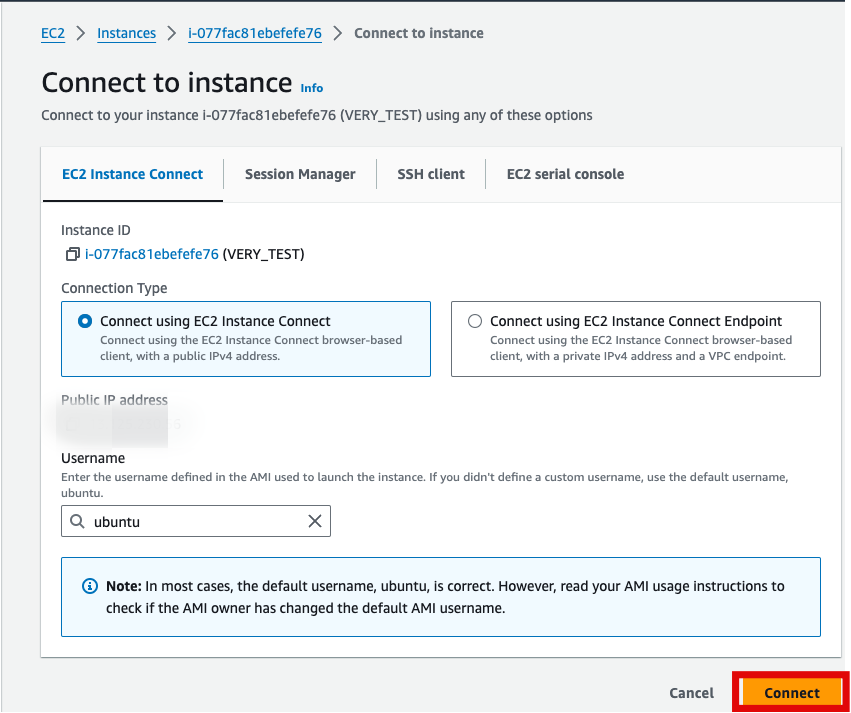
4. Connecting to the server

Click the Connect button in the top right corner

<figure><img src="https://content.gitbook.com/content/9EJKm4MWc99wv6C4AOqx/blobs/T9u84zU9dpelAQprSzBn/%E1%84%89%E1%85%B3%E1%84%8F%E1%85%B3%E1%84%85%E1%85%B5%E1%86%AB%E1%84%89%E1%85%A3%E1%86%BA%202024-01-16%20%E1%84%8B%E1%85%A9%E1%84%92%E1%85%AE%208.53.26.png" alt=""><figcaption></figcaption></figure>

Click the Connect button in the top right corner

<figure><img src="https://content.gitbook.com/content/9EJKm4MWc99wv6C4AOqx/blobs/dgmyKzp26GGlyS2UPaKs/%E1%84%89%E1%85%B3%E1%84%8F%E1%85%B3%E1%84%85%E1%85%B5%E1%86%AB%E1%84%89%E1%85%A3%E1%86%BA%202024-01-16%20%E1%84%8B%E1%85%A9%E1%84%92%E1%85%AE%208.55.17.png" alt=""><figcaption></figcaption></figure>

5. To copy the downloaded attachment to the server, use the following scp command

`scp -i {key파일위치} Guide.zip [ubuntu@](<mailto:ubuntu@3.36.86.95>){IP입력}:/home/ub untu`

* **{location of key file}** should be replaced with the location where the EC2 key file was downloaded.
  * Example: `~/Downloads/key.pem`
* **{enter IP address}** should be replaced with the server's IP address.
  * For the blurred part, enter the value of the Public IPv4 address.
  * Example: `1.1.1.1` This should be in the form of a four-digit number.

<figure><img src="https://content.gitbook.com/content/9EJKm4MWc99wv6C4AOqx/blobs/yraMp0bntZ67IDtm7iQ3/%E1%84%89%E1%85%B3%E1%84%8F%E1%85%B3%E1%84%85%E1%85%B5%E1%86%AB%E1%84%89%E1%85%A3%E1%86%BA%202024-01-16%20%E1%84%8B%E1%85%A9%E1%84%92%E1%85%AE%208.46.20.png" alt=""><figcaption></figcaption></figure>

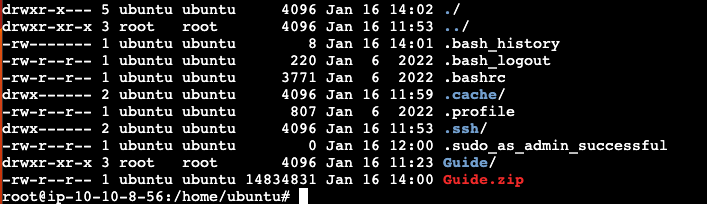
6\. extract the files you copied earlier in step 5

```
sudo -s
apt-get -y update && apt-get -y install unzip
unzip Guide.zip
```

<figure><img src="https://content.gitbook.com/content/9EJKm4MWc99wv6C4AOqx/blobs/ybpiBuBtBvXCN5NKP1iu/%E1%84%89%E1%85%B3%E1%84%8F%E1%85%B3%E1%84%85%E1%85%B5%E1%86%AB%E1%84%89%E1%85%A3%E1%86%BA%202024-01-16%20%E1%84%8B%E1%85%A9%E1%84%92%E1%85%AE%2011.03.00.png" alt=""><figcaption></figcaption></figure>

7. In key.json, enter the "Very Node private key" that was emailed to you.

```
{
  "key": "Paste a private key here"
}
```

8. Run 0/1

<pre><code><strong>cd Guide
</strong>sh 0_prepare.sh
sh 1_build.sh
</code></pre>

9. Run 2/3&#x20;

```
sh 2_execute.sh
sh 3_log.sh
```

If you see a log like the red box below when you run it 3 times, it's a successful run
<figure><img src="https://content.gitbook.com/content/9EJKm4MWc99wv6C4AOqx/blobs/HxPenTSm1NCrQeKteo1J/%E1%84%89%E1%85%B3%E1%84%8F%E1%85%B3%E1%84%85%E1%85%B5%E1%86%AB%E1%84%89%E1%85%A3%E1%86%BA%202024-01-16%20%E1%84%8B%E1%85%A9%E1%84%92%E1%85%AE%2011.11.19%20(1).png" alt=""><figcaption></figcaption></figure>